
This guide demonstrates how to set up the new Samourai Wallet on Android and secure the seed phrase in a strong stainless steel backup called Kiboruto, created by @Crazyk_031 and @stackbitme. You can find Kiboruto and others at crazyk3d.com.
Introduction
If you’ve taken custody of your own bitcoin, congratulations on taking the first step toward a permission-free life. Now, you need to make sure that your bitcoins are safe and secure from environmental hazards like fire and flood. Writing backup information in a notebook is a good start, but at some point, you may find that this is not safe enough when you consider the dangers of the environment.
When you take radical responsibility of your own custody through bitcoin, you and you alone are responsible for the funds. There is no charge-back feature or 1-800 helpline with Bitcoin, so you’ll want to make sure you take precautions to protect your funds. Since Kiboruto was created for the Samourai Wallet, that wallet will be the focus of this guide. With the Samourai Wallet, there are three important pieces of information you want to keep safe:
1. Seed Words
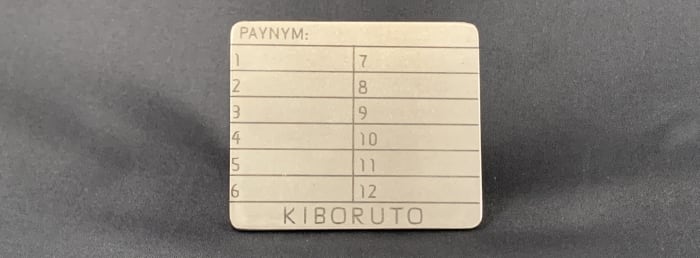
When you set up your Samourai Wallet, you’ll be given a list of 12 words known as “seed words,” sometimes called “seed phrases” or “mnemonic phrases.” These 12 seed words are a key piece of information that allows you to restore your Bitcoin wallet in the event that your phone is lost, or stolen, or damaged beyond repair, for example. Seed words should always be stored in the same order as your wallet. If you get one word in the wrong order, it can render your bitcoin reserves worthless. Be prepared for the worst and secure seed words like gold or jewelry.
2. Password
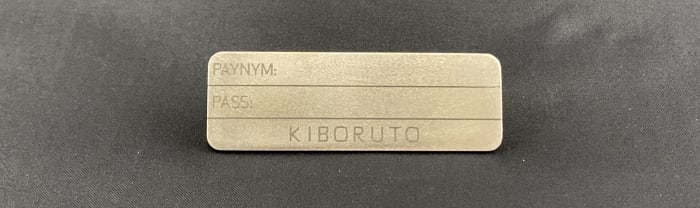
You will also set a password when you create your Samourai Wallet. The password is unique that you set, not generated by Samourai Wallet. Your Samourai wallet has no way of knowing the passphrase you set and also, the passphrase you enter will return the correct wallet. Whether the wallet contains your bitcoins or not depends on your ability to enter the same passphrase that you set when you first set up your wallet. Unlike seed words, which come from a predefined list of 2,048 English words, passphrases can include any combination of lower/uppercase letters, numbers and special characters you want to use.
3. PayNym
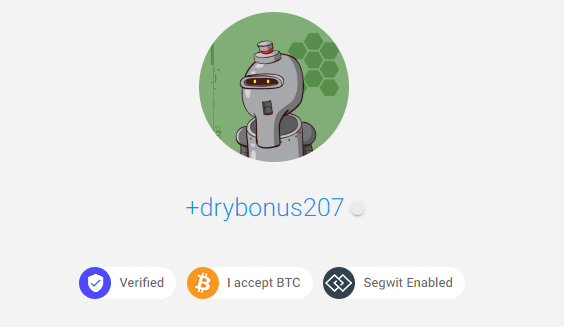
Last but not least your PayNym. PayNym is a unique name and avatar associated with your wallet. You can use this PayNym to verify that you have restored the correct wallet. Your PayNym can do more though: It can display static payment codes to receive funds without revealing your previous transaction history to anyone. Use PayNym to connect with other Samourai Wallet users so you can build collaborative CoinJoin transactions like Stowaway or StonewallX2. Check out usecahoots.com to learn more.
The next section will walk you through exactly how to get these three pieces of information from the new Samourai Wallet.
Setting up the Samourai Wallet
The Kiboruto stainless-steel reserve is specially designed for your Samourai Wallet. Stainless-steel backups like these can withstand extreme environmental conditions such as house fires or heavy flooding. Sometimes, people will use pen and paper to write seed phrases – this is a good start and if you want to use pen and paper, then download the Samourai Wallet recovery template here. But your paper backup may not survive a house fire or flood, so use both methods to be safe. But remember, anyone who gets access to this information will technically be able to get access to your bitcoins, so stay safe.
Here’s a video on how to set up a Samourai Wallet for the first time and get the seed words you’ll stamp on Kiboruto. Please note that the wallet version (0.99.96g) used in this video has been updated to a newer version with a detailed explanation introduction. The new version will be shown later in the guide when showing how to recover the seed word.
The next section will guide you on how to stamp your Samourai wallet backup information to Kiboruto. You can download Samourai Wallet for Android devices directly from the Samourai Wallet website or use the F-Droid storage option or the Google Play Store option listed on the website as well.
Stamping The Kiboruto
Once you have set up your wallet and identified PayNym, you can navigate back through the menu to display the seed word and stamp it to Kiboruto, as shown in the video below.
- From the Samourai Wallet homepage, navigate to the three-dot menu in the upper right corner and select “settings,” then “wallet,” then “show mnemonic.” A dialog box will appear with your 12 seed words. These are the words you want to stamp into Kiboruto in order.
- To test the passphrase before stamping, from the Samourai Wallet home page, navigate to the three-dot menu in the upper right corner and select “settings,” then “resolve problems,” then “test passphrase/backup.” From there, you can enter your passphrase and Samourai Wallet will confirm that it is correct. Once you know you have it right, you can stamp it on Kiboruto.
- To view PayNym from the Samourai Wallet home page, navigate to the blue “+” sign in the lower right corner and select the purple PayNym icon. Your PayNym short name will be displayed directly below your PayNym robot avatar.
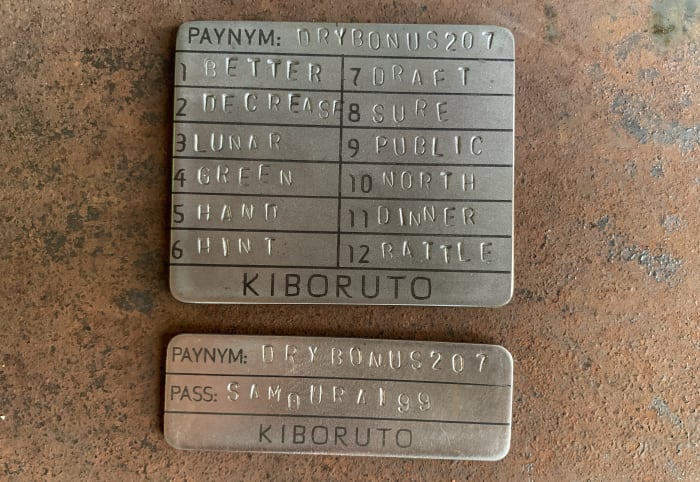
Make sure you use a solid surface to stamp the Kiboruto, like a concrete floor. A heavy hammer, like a four-pound mini sledge, works well to get a crisp stamp. You will stamp the 12 seed words in sequence on the large Kiboruto plate and then stamp the password and PayNym on the small Kiboruto plate. This way, you can store the two pieces of information separately if you want. You need two pieces (seed word and passphrase) to recover your bitcoins if you lose access to your wallet.
Now you should have your seed word, unique PayNym and secure password in metal in Kiboruto. This way, you have the information you need to restore your Samourai Wallet and recover your bitcoins if your phone is lost, damaged or stolen or your backup is damaged by fire or flood.
The next part will demonstrate a fire test of Kiboruto to verify that the backup information can be restored in case of extreme environmental conditions.
Kiboruto Fire Body
Any stainless steel backup must be fire or flood resistant. But testing these backups is important to verify that the information inside is recoverable. You may not want or have the necessary tools/skills to conduct a fire test yourself, so here is an example of Kiboruto brought to just the melting point, 1,500 degrees celsius.
Kiboruto successfully secured the vital information needed to restore the Samourai Wallet and regain access to bitcoins. The seed phrase is 100% recoverable and even most of the etching survives.
The next section will show you how to restore Samourai Wallet using only Kiboruto backup information.
Restore From Kiboruto
The best thing about seed words is that they follow the popular BIP39 standard. This means that you can use different Bitcoin wallets to withdraw funds from this kind of reserve. For example, if you lose your mobile phone and buy a new one, you can download the Samourai Wallet app again and then follow these recovery steps using Kiboruto to regain access to your bitcoins.
Once you start the Samourai Wallet, you will have the option to connect to Tor and connect to RoninDojo itself. Then you will have the option to restore from backup. Just enter the seed word from Kiboruto and then add the password from Kiboruto and then you should be given the same PayNym as the original and get access to bitcoins again.
Conclusion
That should be all you need to restore your Samourai Wallet after the disaster of losing your phone and needing to restore access to your bitcoins. If you have questions about the wallet derivation path, WalletsRecovery.org has compiled the best Bitcoin wallets in the list.
Here are the Samourai Wallet derivative paths, for example:
- Stock: m/44’|49’|84’|47’/0’/0′
- Bad Bank: m/84’/0’/2147483644′
- Pre Mix: m/84’/0’/2147483645′
- Mixed Post: m/84’/0’/2147483646′
- Ricochet: m/44’|49’|84’/0’/2147483647′
When restoring Samourai Wallet in other Samourai Wallet clients, you don’t need to worry about the derivative path. This will only be a consideration if restoring the platform to another wallet.
Some final considerations are how many copies of Kiboruto you want, where to store them and whether or not you store your passphrase separately. Each person’s threat model, situation and circumstances are unique, so each individual must make their own decisions. Remember that an adversary can recover your wallet if they discover your words and passphrases.
Using RoninDojo is the most private way to use the Samourai Wallet. @BitcoinQ_A wrote a great guide on getting started and there are complete instructions maintained on the Ronin wiki page. There’s also a Bitcoin Magazine guide on setting up the new plug-and-play RoninDojo Tanto. If you have any questions, please get in touch. Both development teams maintain excellent community support channels on Telegram:
This is a guest post by Econoalchemist. Opinions expressed are entirely their own and do not necessarily reflect those of BTC Inc or Bitcoin Magazine.